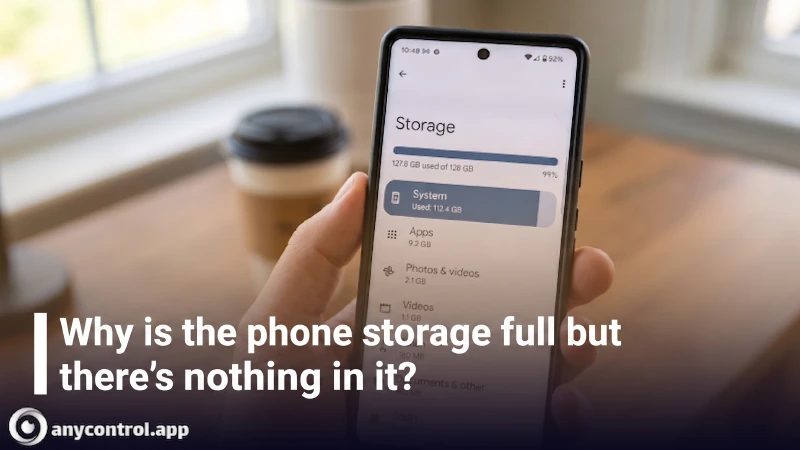
Have you ever tried to snap a quick photo or download a new app, only to be hit with the dreaded "Storage Full" error? You frantically check your gallery and see you barely have any files. So, why is your phone storage full but nothing is on it? Finding the root cause of your phone's storage getting full is the first and most crucial step to saving your device from this digital crisis.
Many users believe that simply deleting a few photos will solve the problem. However, whether you own a Samsung, Xiaomi, or iPhone, the real culprits behind a full memory are usually hidden awa like massive cache files and system junk.
In this comprehensive guide, we will dissect the main reasons behind this frustrating issue and teach you definitive, quick solutions to free up space fast.
Table of contents14 sections
Why Does Phone Storage Get Full for No Reason?
Sometimes you check your gallery and see no large files, but the "Storage Full" error persists. The reason lies in the increasingly complex architecture of modern operating systems (like Android and iOS) and how applications secretly hide data. Let's take a closer look at the main suspects.
The Multi Gigabyte Trap of Telegram and WhatsApp
It might be hard to believe, but messaging apps and social media platforms are the biggest culprits when it comes to draining your phone's memory. As you scroll through different groups and channels, every video or photo you view is automatically saved in the background.
This allows the media to load faster the next time you open the app. This invisible process creates what is known as "Cache" memory.
Application
Average Cache Size (Per Month)
Type of Hidden Data Consuming Storage
Telegram
3 to 8 GB
Video messages, cloud files, and GIFs
Instagram
2 to 5 GB
Reels and post previews
WhatsApp
1.5 to 4 GB
Nightly database backups and received media
TikTok
2 to 4 GB
Pre-loaded videos, drafts, and filters
As you can see in the table, the accumulation of this information over time is a primary reason for unnecessary storage consumption. This requires periodic cleaning through the security or storage settings of the apps themselves.
System Files and Abandoned Updates
Keeping your phone updated is always a great practice, but how are the downloaded files for these updates managed?
Old Updates: Sometimes, the OS fails to automatically delete the installation files of previous updates. This is a very common issue that takes up a massive chunk of your storage. When you check your settings, you'll often see "System" consuming the most space.
The System Data Dilemma on iPhone: In recent iOS updates, system errors, Safari browser data, and Siri voices gradually fill up the "System Data" section. Unfortunately, Apple does not give users direct access to delete these files easily.
Forgotten Trash Bins: PDF files in your Downloads folder, as well as photos you've deleted, stay in the "Recently Deleted" or trash folder for up to 30 days. These ghost files continue to occupy your fast internal storage without you realizing it.
Warning Signs Before Your Storage is Completely Full
Before you receive the final "Storage Full" error, your phone will usually send out distress signals. Recognizing these symptoms early can help you take action before your phone becomes completely unusable.
Here are the most common red flags to watch out for:
Warning Sign
Technical Reason for the Issue
Unexplained Overheating
The processor is working overtime, constantly searching for available memory blocks to execute basic tasks.
Sudden App Crashes
Applications simply do not have enough temporary space (RAM and internal storage combined) to load or execute commands.
Shutter Lag in Camera
The image processor cannot write data fast enough to the nearly full memory, causing a delay when saving photos or videos.
Missing Notifications/Texts
The operating system forcefully stops background services to preserve whatever vital space is left for core functions.
Quick and General Solutions to Free Up Storage
Now that you are familiar with the hidden roots of the "Phone Storage Full" problem, it is time to take action. In this section, we will introduce methods that free up significant space instantly.
These techniques do not require installing third-party applications, are completely safe, and will not compromise your personal data or login credentials.
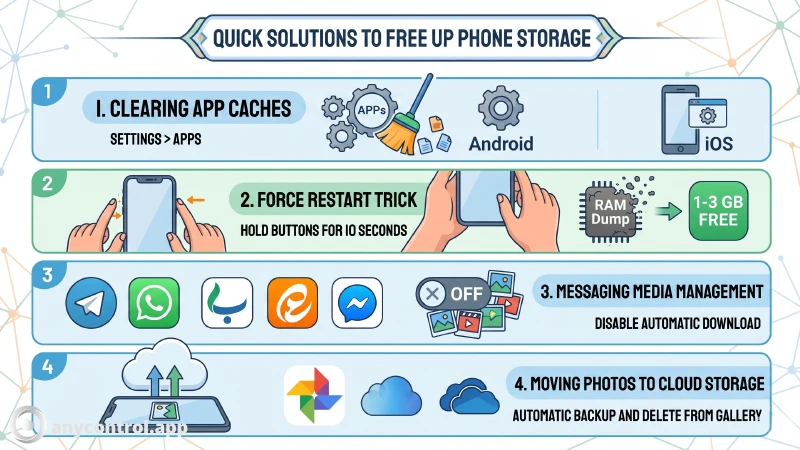
Clearing the Phone's Built in Cache
Modern smartphones from brands like Samsung and Xiaomi have built-in optimization tools. You can usually find a dedicated storage cleaning option right in the main settings menu.
By navigating to your phone's "Device Care" or "Storage" section, you can easily command the system to scan for and delete unnecessary cache files, leftover installation packages, and memory junk with just one tap.
How to Clear App Cache on Android
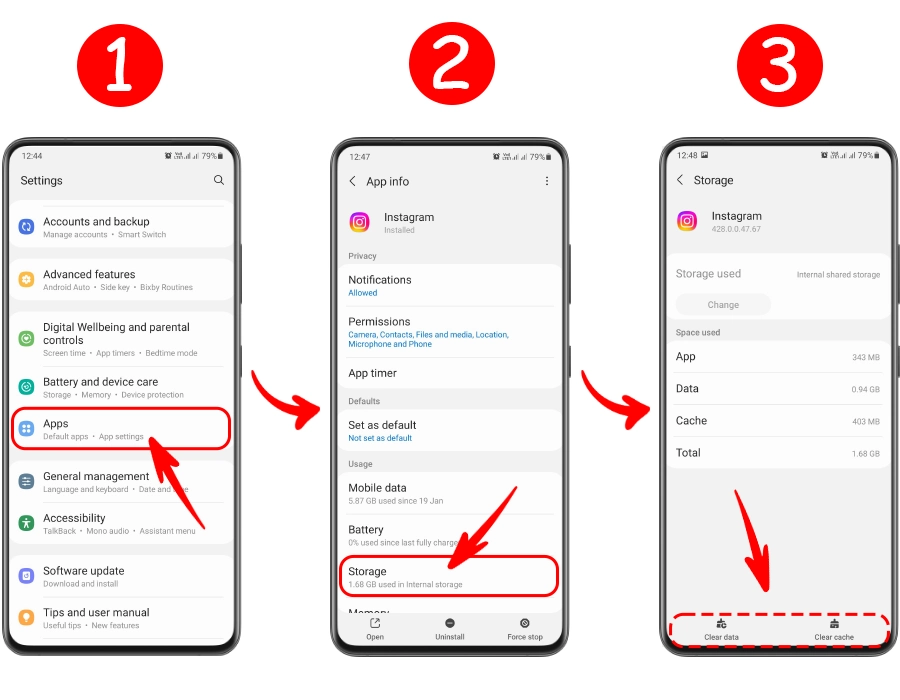
For Android users, clearing individual app caches is the fastest way to reclaim gigabytes of lost space. Follow these simple steps:
Go to your phone's Settings and tap on Apps (or App Management).
Scroll through and select the applications you know consume a lot of data (like Telegram, WhatsApp, Instagram, or TikTok).
Tap on the Storage section within the specific app info page.
At the bottom of the screen, tap Clear Cache (Do NOT tap "Clear Data" unless you want to log out and delete all your chats and settings).
Note: The interface might look slightly different depending on whether you are using a Samsung (One UI) or a Xiaomi (MIUI/HyperOS), but the core process remains exactly the same.
If you still can’t free up enough storage space after using these methods, check out our specialized guides on clearing storage for Samsung, Xiaomi, and iPhone.
Clearing Temporary App Data on iPhone
Unlike Android, Apple's iOS does not have a direct "Clear Cache" button for individual apps in the main settings. The best method is to use the internal storage settings of the apps themselves.
However, iPhones have a brilliant built-in feature called Offload Unused Apps.
Go to Settings > General > iPhone Storage.
Select an app you rarely use and tap Offload App.
This deletes the heavy core application files but securely saves your personal data. You can reinstall the app later, and everything will be exactly as you left it.
The Simple Yet Effective Force Restart Trick
Sometimes you need to free up phone memory in a matter of seconds. When temporary data gets locked in the internal memory, it causes a false "Storage Full" reading.
A simple Force Restart can fix this system glitch. By pressing and holding the Power button and Volume Down button simultaneously for about 10 to 15 seconds, your phone will reboot forcefully. This clears temporary system codes and can often free up 1 to 3 GB of "ghost" space instantly without deleting your files.
Managing Media Files in Messaging Apps Telegram & WhatsApp
As mentioned earlier, messaging apps are the silent killers of your phone's storage. Managing cache in these apps, which exchange heavy multimedia files daily, is absolutely critical.
🔵Telegram: You can go to Settings > Data and Storage > Storage Usage. Here, you can set a maximum storage limit (e.g., 5 GB) and configure the media retention period to "1 Week" so old files auto-delete.
🟢WhatsApp: You must disable the "Media Auto-Download" feature. Additionally, you can clean up heavy chats and forwarded media through the "Manage Storage" section in the app's settings.
Note: These in-app features are not limited to Android. You can easily clear the cache for messaging apps on any device, including iPhones, directly through their respective interfaces.
Moving Photos and Videos to Cloud Storage
High-resolution photos and videos, such as 4K recordings or portrait shots, take up the most space on your device. The permanent and most professional solution is to use cloud storage services.
This not only frees up your phone's physical memory but also guarantees the safety of your data against device loss or damage.
Cloud Service
Free Initial Storage
Best Feature for Phone Storage Management
Google Photos
15 GB
The golden "Free up space" feature that automatically identifies and deletes photos already backed up.
Apple iCloud
5 GB
Flawless integration with the Apple ecosystem and the "Optimize iPhone Storage" feature for image compression.
OneDrive
5 GB
Excellent integration for backups and fast, wireless file transfers between mobile and Windows PCs.
By enabling automatic backup, you can safely delete old photos from your local gallery, knowing you can access them anywhere, anytime.
Why is My Phone Storage Full When I Have Nothing on It?
One of the most frequent and frustrating queries from users is: "I completely emptied my gallery and apps, but I still get the Storage Full error!"
Or sometimes, the apps and media sections in the storage settings show zero bytes, but the "System" is taking up the entire device capacity. In this scenario, you are dealing with ghost files or hidden system data. To uncover this hidden section, you need to dig deeper like a detective.
Hidden Malware and Viruses: Some malicious apps downloaded from unofficial sources start downloading massive ad files or even mine cryptocurrency in the background. They fill up your storage rapidly without even having an icon in your app drawer.
Thumbnail Files: Every time you open your image gallery, the system creates tiny, low-quality versions of your photos (thumbnails) so they load faster next time. In older phones, the hidden .thumbnails folder can easily grow to several gigabytes!
Secure Folder or Second Space: On Samsung and Xiaomi devices, there are isolated spaces designed to hide personal files. Videos or photos moved here vanish from the main gallery but still consume your primary storage as obscure system files.
Advanced Techniques to Find Large Files
To accurately identify these hidden files, you don't need to root your Android phone or jailbreak your iPhone. You just need to use smart tools:
Showing Hidden Files: In a file manager app like "My Files", go to settings and turn on "Show hidden system files". Now, folders starting with a dot (like .nomedia or .trash) will appear, which usually contain digital junk.
In-App Data: Apps like Spotify or YouTube allow offline downloads. These encrypted files don't show up in your gallery. To delete them, you must go directly into the app's settings and clear offline downloads.
Best Apps for Managing Phone Storage
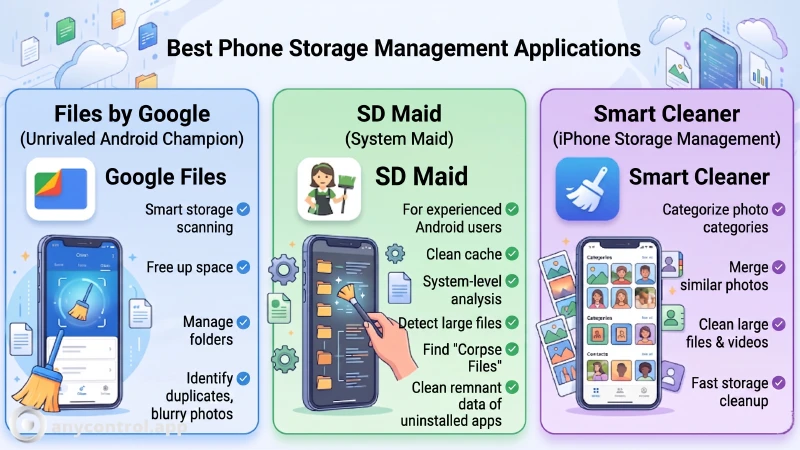
If you want to use a storage cleaner app, you must choose tools developed by reputable creators that focus on finding redundant files rather than just "killing" background apps. Here are the safest and most effective options:
Files by Google: This is arguably the best assistant for clearing internal storage. The "Clean" tab uses AI to scan your folders. Its standout feature is identifying duplicate files, old screenshots, blurry photos, and memes that you can delete with a single tap.
SD Maid: If your OS has left behind old installation files and "corpse data" from deleted apps, SD Maid acts as a digital scavenger. it penetrates deep into system directories to find and eliminate files that standard cleaners miss.
Smart Cleaner (for iOS): Since iPhone users cannot access system files directly, Smart Cleaner helps by organizing the gallery. It categorizes large videos, merges duplicate contacts, and groups similar photos for quick deletion.
Built in Tools vs. Third Party Apps: Which is Better?
Feature
Built-in Tools (e.g., Device Care)
Files by Google
Generic "Speed Booster" Apps
Battery Consumption
Optimized for system
Very Low
High (due to background ads)
Ads & Pop-ups
None
None
Extremely Annoying
Duplicate Detection
Basic
Advanced (AI-powered)
Often Inaccurate
Privacy & Security
Guaranteed by Manufacturer
Guaranteed by Google
High risk of data tracking
Expert Suggestion: Manually finding "ghost files" can be exhausting and often yields poor results. One of the most effective ways to clear a phone that is "full but empty" is a Factory Reset. However, ensure you back up all your essential data to an external device or cloud storage before proceeding.
Conclusion
Running out of phone storage is a persistent challenge in today's high-definition world. As cameras get better and apps get heavier, even a 512GB device will eventually fill up. As we explored in this guide, the key to escaping the "Storage Full" nightmare is Smart Management.
By utilizing cloud storage, periodically clearing caches from heavy apps like WhatsApp and Telegram, and using AI-driven tools to find hidden junk, you can keep your phone running smoothly without needing to buy a new device.
FAQ Phone Storage Full
This is usually due to "System Data" (formerly Other Storage). It includes logs, caches, and Siri voices. A Force Restart or a full backup and restore via iTunes/Finder often clears this up.
No. Clearing "Cache" only removes temporary files like thumbnails and pre-loaded videos. Your actual messages, accounts, and settings remain safe. Only "Clear Data" (on Android) will reset the app.
Most generic cleaners are "ad-ware" and can slow down your phone. Only trust verified apps like Files by Google or the built-in storage manager provided by your phone's manufacturer.
I’m a content writer passionate about technology, software, and digital trends. I enjoy researching new topics and turning complex ideas into clear, useful, and engaging content for readers.
Staff management It is a key part of human resource management. Staff management strategies refers to organizing numerous operations so that actions contribute to the company's success. Learn all you need to know about supervising and guiding the employees for efficiency in performance in the staff management section.