Permanently Disabled Instagram Account | How to Get my Account Back
Published:
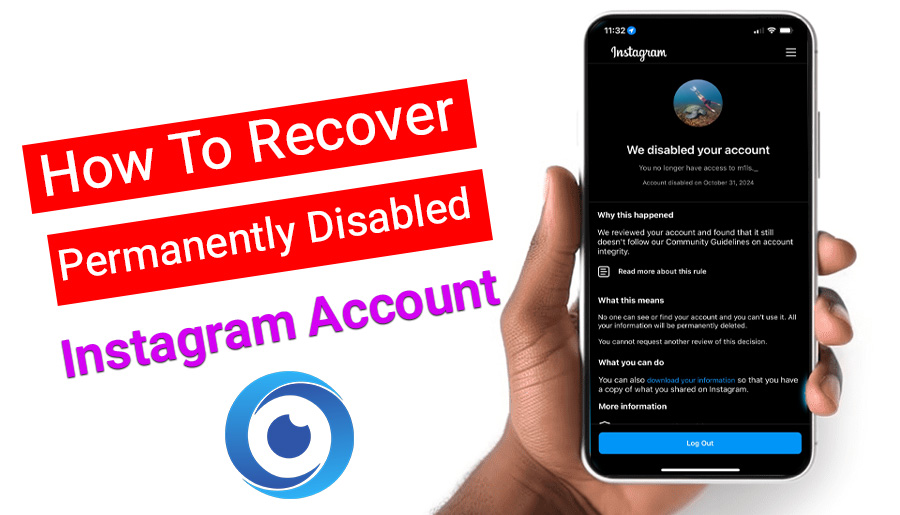
Have you ever woken up to find your Instagram account suddenly disabled for no obvious reason? It’s incredibly frustrating, and naturally, your first question is whether you can get it back. The good news is that there are methods you can try, and many users have successfully recovered their permanently disabled accounts. In this article, I’ve gathered real user experiences and insights to help you understand what works and how you can restore your account.
Table of contents8 sections
Why Your Account Was Disabled
Instagram disables accounts for reasons such as:
- Violating community guidelines (nudity, hate speech, impersonation, threats)
- Copyright or trademark violations
- Using automation tools (bots, bulk following/unfollowing)
- Unusual activities
- Reports from other users
- Suspicious activity (logging in from unfamiliar places or VPNs with different IPs)
- Mistakenly flagged by the system

Why Face Verification Leads to an Account Being Disabled
There are some reports that face verification will also cause account being disabled!
Instagram uses face verification to confirm the account owner is a real person. So, when face verification results in a disabling, it usually means:
Instagram detected unusual activity before the verification
If the system already flagged the account for automation tools, mass following/unfollowing, rapid login attempts or suspicious IP locations, the face verification step can trigger the final review that leads to a temporary or permanent disable.
Sometimes Instagram asks for face verification as the final step of a security check. If the system already thinks the account violates guidelines, the disable happens afterward, not because of the selfie, but because the review completed.
💡Face verification can trigger a deeper review, and that review may result in the account being disabled if the system finds a violation.
Is permanently disabled mean deleted forever?
Not necessarily!
On Instagram, “permanently disabled” does not mean your account is deleted forever! but it can become permanent if you don’t successfully appeal.
Here’s what Permanently disabled means:
- Instagram has blocked access to your account, sometimes for violating a policy or often by mistake.
- Your profile becomes invisible to others.
- You cannot log in or use the account unless your appeal is approved.
If Instagram denies all appeals or decides the violation is serious, the account may eventually be deleted and cannot be recovered. But many users with “permanently disabled” warnings have restored their accounts through successful appeals. So do not panic and read the rest.
Also Read: How to Recover Instagram 2FA
Disable Account Recovery Form
There are multiple recovery forms on the net that none of them actually works! You can send appeals and Instagram will never answer. This is one of the biggest sources of frustration for users.
Over the years, Instagram has changed how appeals are handled. Although many old support forms still exist online, Meta has quietly stopped responding to most of them. They remain publicly accessible, but they no longer trigger human review and they rarely generate an email response.
Some common Instagram recovery / appeal links are listed in the table below. My suggestion is to appeal on these forms 2 or 3 times within the first 2 or 3 days. But answering is not guaranteed.
|
“My Instagram Account Was Disabled” (official appeal form) |
https://help.instagram.com/366993040048856 |
|
Instagram Account Hacked Appeal Form |
https://www.instagram.com/hacked |
|
Recover Business Pages |
|
|
Instagram Help Center |
Why Instagram Doesn’t Answer These Forms
Instagram now relies heavily on automated systems. AI systems decide:
➖️which accounts get disabled
➖️which appeals get reviewed
➖️whether a human moderator sees your case
That is why many Instagram accounts are disabled by mistake and most form submissions never reach a human.
Meta unified support behind Facebook Business tools is the key to talk to Instagram agents.
Instagram now prioritizes:
➖️business accounts
➖️accounts spending on ads
➖️creators with monetization
➖️verified accounts with meta verified blue tick
This means that general users often receive no response!
Instagram Support Email Address
Instagram does not offer phone call support, but you can still use Instagram Support Email Address.
Emails typically take 1 to 5 business days to receive a response, if they do! Customer service requests. Customers can contact Instagram at support@instagram.com.
How to Recover a Permanently Disabled Instagram Account
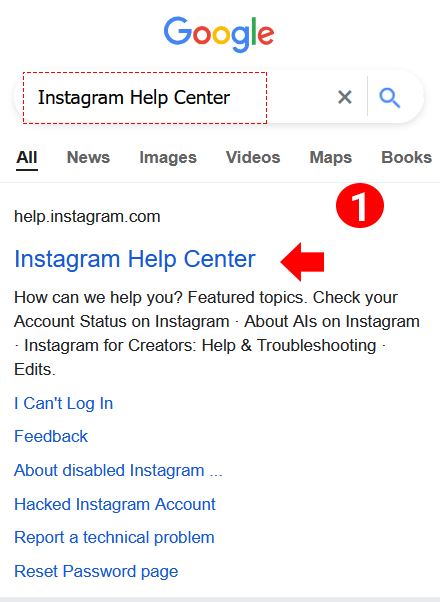
1. Open any browser and type “Instagram Help Center”.
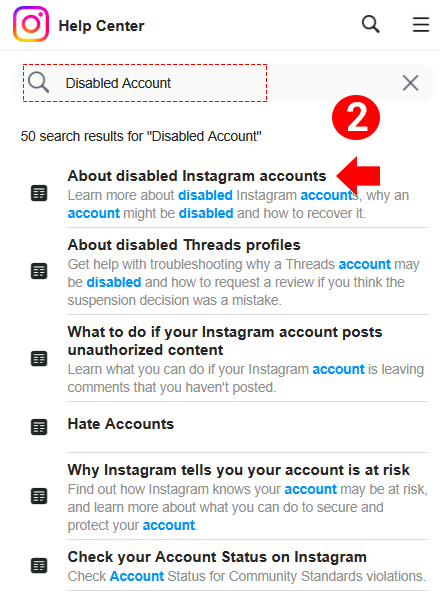
2. Enter the link and in the search bar type “Disabled Account”. You will see search results. Tap on “About Disabled Instagram Accounts”.
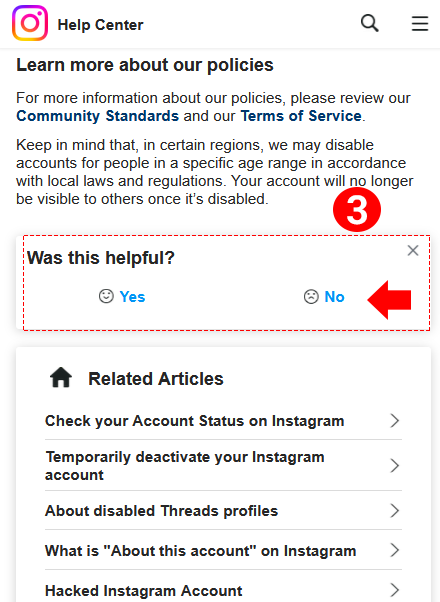
3. Scroll down and in the box written “Was this helpful?” click “No”.
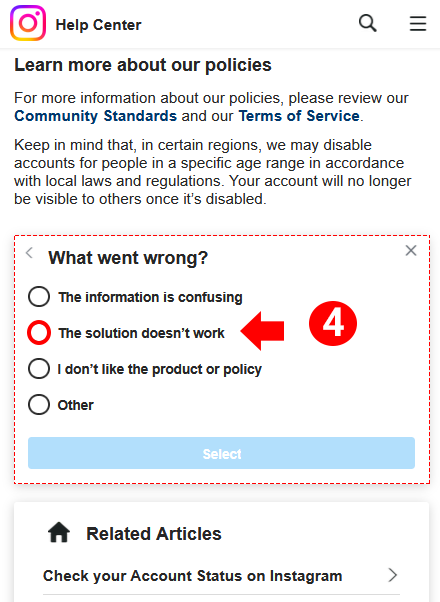
4. Choose the option “the solution doesn’t work” and click on “select”.
5. Now a box will appear. In this box explain the issue about your account and make sure to add your username and email address associated with your disabled account.
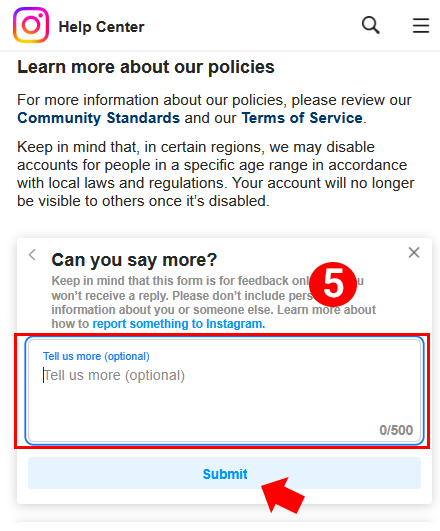
Hello Instagram Support Team,
My account [@YourUsername] was recently disabled, and I believe this was a mistake. I have always adhered to Instagram’s Community Guidelines and Terms of Use.
I respectfully request that my account be reviewed and reinstated. I am happy to provide any additional information or verification needed to confirm that I am the rightful owner.
Thank you for your time and assistance. I sincerely hope this issue can be resolved quickly.
Best regards,
[Your Full Name]
[Email linked to the account]
How to Talk to Human Instagram Agent to Appeal
Here’s how to contact Meta Verified (support for subscribing users) if you have an active subscription. It works only for people who have paid for the Meta Verified service.
Meta Verified subscriptions can be purchased on a monthly basis. You are not required to commit long-term, you can pay for just one month to contact support for your issue and cancel anytime.
- Open the Instagram or Facebook mobile app (on iPhone or Android).
- Go to your profile. Then tap on menu (three‑lines / ≡).
- Find Help & support (or similar).
- Look for the “Meta Verified Support” option.
From there you can choose to start a chat or send a support request via email, depending on what’s offered in your region.
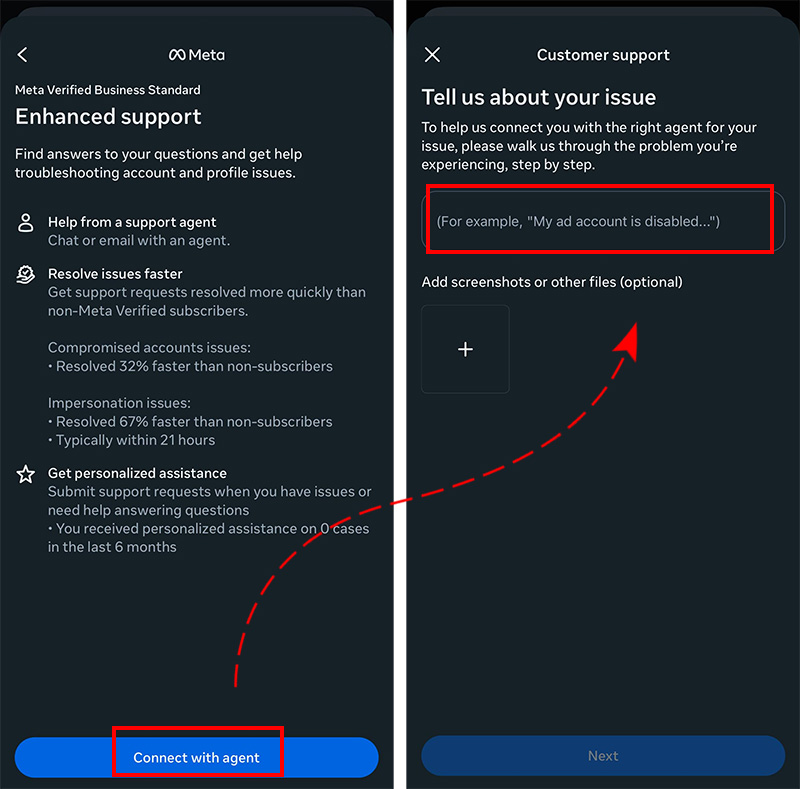
After submitting, you get a case ID for tracking your support ticket.
Some users paying for Meta Verified say the support answers slowly or not at all, especially for serious issues like account suspension or bans.
In some cases, people report that even with subscription, the “contact support” button doesn’t work or support gets restricted. Because of this, having Meta Verified does not guarantee that your problem (especially bans or disabling) will be solved.
But it is the best option you have to get your disabled account back! Many users could resolve the issue and restore the account using this option. You need to enable meta verified for another account or use an account that is already verified. Then you need to reach support and write:
Dear Instagram Support Team,
My other account [@YourDisabledUsername] has been disabled / hacked, and I am requesting assistance to regain access. Both accounts belong to me, and I am happy to provide any verification or documentation necessary to confirm ownership.
Disabled Account Details:
Username: [YourDisabledUsername]
Email linked to account: [YourEmail@example.com]
Thank you very much for your time and support. I look forward to your guidance in recovering my account.
Best regards,
[Your Full Name]
[Your Meta Verified Account Username / Email]
Meta Verified support will likely ask for proof that you own the disabled account. This can include:
- A selfie holding a verification code
- A government-issued ID (driver’s license, passport)
- Proof of linked email or phone number
If you could recover your disabled account using these methods or any other, please write it in the comment section so that other users with the same issue can use your experience.

Read the latest news about technology, social media platform and lifestyle in this section.

Learn How to do anything through by step by step tutorials and photo guides in this section.

Tips and Tricks and social media hacks are posted in this section regularly to improve your experience when using technology.

Staff management It is a key part of human resource management. Staff management strategies refers to organizing numerous operations so that actions contribute to the company's success. Learn all you need to know about supervising and guiding the employees for efficiency in performance in the staff management section.
Learn about online safety rules and what not to do on the internet by reading the articles of this section.

Learn how to root your Android smart phone with step by step tutorials and photo guides.
Discover regular and free tutorials and start learning or improving your skills in using technology and social media platforms.

You can download drivers and programs needed for rooting and changing the ROM of Android phones and other devices from this section.

In this section, discover the latest methods of making money online using the internet and mobile phones.

Read the articles in this section, stay informed about the latest and most profitable cryptocurrency airdrops and how to claim them.

The tutorial for installing & activating the AnyControl application on devices with various models is located in this section
5 months ago
Instagram smoke_drip20 foi desativado sem motivo me ajudem. Segui as regras certo isso e injusto não quero perder a conta por favor e a única que tenho usarei pro trabalho também. :(
6 months ago
My Instagram account was disable on 5, november, 2025 please you can help me😭
6 months ago
Hello, my long-term Instagram account @luyanhao1991 was disabled, and it impacted my linked Facebook/business presence. I no longer have access to any appeal option. This account was important for communication and business continuity. I respectfully request a manual review or escalation if possible. Thank you.
6 months ago
I need my account to be appeal
9 months ago
My account was taken down without any clear reason, and no matter what I tried at first, nothing worked. I was honestly stressed and frustrated because I didn’t know what else to do. After weeks of stress, my account was finally restored, and the relief I felt was unreal.
9 months ago
My Instagram account was disabled automatically because it was connected to a Facebook account that was disabled. I believe this was a mistake. I did not violate Instagram’s policies and I kindly request a review.